

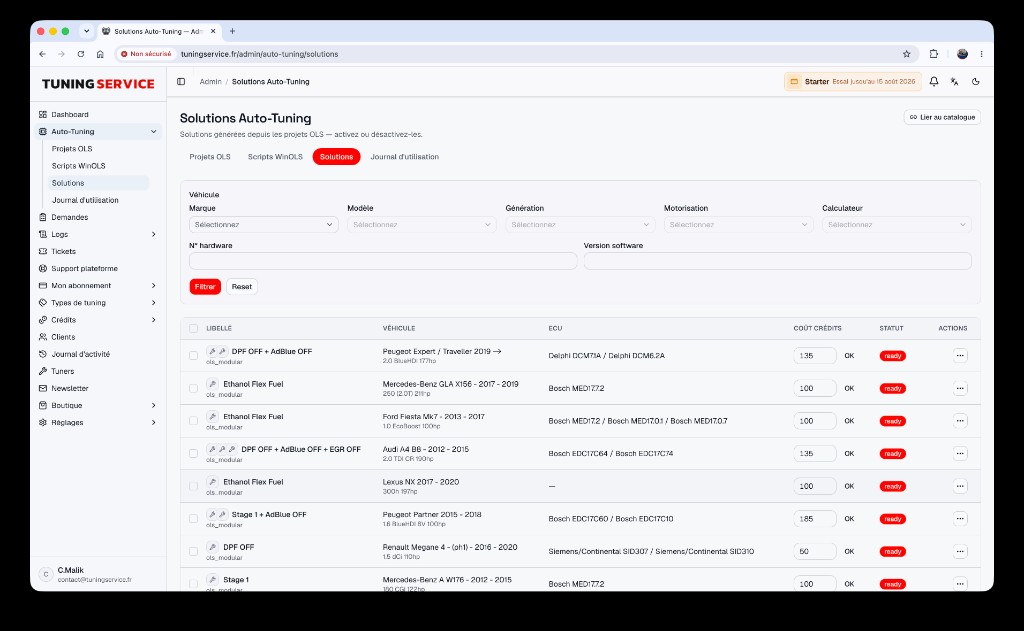
Managing ECU files and WinOLS projects is at the heart of professional tuning. Yet, too many workshops start from scratch for every request—even on already-processed ECUs. With the TFS Auto-Tuning module, offer your clients direct access to your online WinOLS library and .OLS projects, while keeping full control over your catalog and workflows. Automate workshop remapping, save time, and maximize your margin—under your brand, on your domain.
What Is the Purpose of the Auto-Tuning Module on the TFS Platform?
The Auto-Tuning module transforms your TFS client portal into a true solutions hub:
- Online WinOLS library: Offer your WinOLS scripts and .OLS projects in self-service, 24/7.
- Automatic ECU file matching: The platform analyzes each uploaded file, directing clients to the right script or .OLS project, or switching to a manual request if no match exists.
- Centralized tracking: Every request, whether automated or manual, is tracked in the workshop’s client portal, with notifications, credits, and consolidated history.
This module suits both workshops aiming to industrialize their file-service and independent tuners wanting to capitalize on their WinOLS expertise. By connecting your own project databases or structuring internal solutions, you never start from scratch on previously processed ECUs.
How Does Auto-Tuning Work for the Workshop and Its Clients?
TFS Auto-Tuning orchestrates workshop flows intelligently:
- Client uploads ECU file in their personalized client portal (logo, domain, notifications in your branding).
- Automatic matching: The module analyzes the file, compares it to your online WinOLS library, and instantly offers the corresponding script or .OLS project.
- Instant delivery if a match exists (ready-to-use script or .OLS project), otherwise automatic fallback to a manual request for custom handling.
- Centralized tracking: Every step (request, delivery, notification, credit used) is visible in the client portal, with no confusion between automated and manual.
For the workshop, every .OLS project or WinOLS script already processed becomes a reusable solution, accessible any time by your clients or team. For clients, it’s a seamless experience: upload, pay, download, and track—all under your brand.
Workshop Benefits: Less Repetitive Work, Higher Margins
Feature → Benefit → Result
- Automate workshop remapping: Every .OLS project or WinOLS script in your library becomes an auto-matched solution, with no manual intervention for already-processed cases.
- Reduce repetitive work: No more identical tickets for common ECUs—clients access the right solution directly.
- Increase margins: Less time spent on recurring requests, more volume processed, and full control over pricing (credits, packs, subscriptions via /monetisation).
- Strengthen your brand: Everything happens on your domain, with your logo, emails, and terms—TFS remains invisible to your end clients.
- Security and compliance: The platform handles hosting, updates, security, and tracking, with no infrastructure or maintenance investment required.
Typical Use Cases
| Workshop Need | With TFS Auto-Tuning | Concrete Result |
|---|---|---|
| Repeat a Golf 7 Stage 1 | Auto-matched WinOLS script | Delivery in under 1 minute |
| Handle 100+ requests/month | Matching + centralized tracking | 30% time saved |
| Sell credit packs | Integrated /monetisation | Instant payment, credit tracking |
| Offer DPF/EGR off | Reusable .OLS projects | Zero recurring manual tickets |
How to Activate the Auto-Tuning Module on TFS?
Activating Auto-Tuning is straightforward, with no development or infrastructure required:
- Choose your plan including Auto-Tuning at /tarifs.
- Enable the module in your TFS admin portal (/auto-tuning).
- Import or create your WinOLS scripts and .OLS projects: structure your library, link existing solutions, or connect reseller bases (/bases-revendeur).
- Configure matching (criteria, manual fallback, notifications) to fit your workflow.
- Test the client experience by uploading a test file from your personalized client portal.
In under an hour, your workshop has a complete WinOLS auto-tuning platform under your brand, with no technical installation. All flows (automated or manual) are managed from one place, with integrated reporting, credit management, and notifications.