

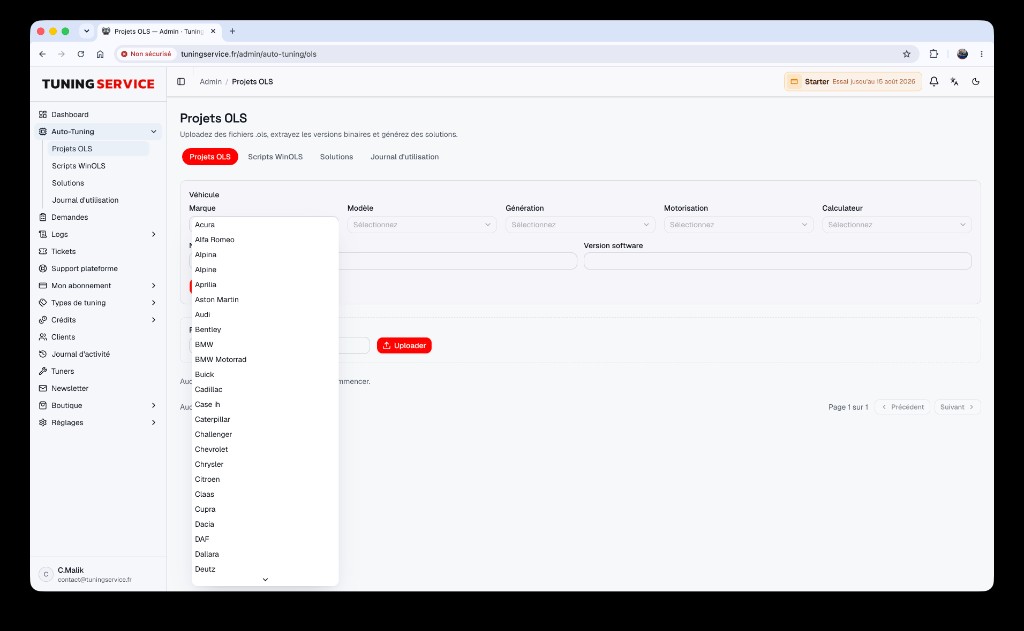
Managing tuning files in a workshop is no longer limited to manual solutions. With the OLS Projects module from the TFS platform, every WinOLS (.ols) project becomes a structured, reusable asset, accessible to your clients autonomously under your brand. Discover how to automate and monetize your online WinOLS library without starting from scratch for every request.
What is the purpose of the OLS Projects module in the TFS platform?
The OLS Projects module lets you import and structure your .ols files from WinOLS to offer them as self-service solutions on your white-label file-service. Thanks to automatic ECU file matching, each .ols project becomes a ready-to-use solution: when a client uploads an ECU file, the platform instantly searches your online WinOLS library for a match. If no project is found, the request automatically switches to manual handling, always under your control.
This module enables workshops to:
- Centralize and organize all created or acquired .ols projects
- Automate ECU matching
- Monetize each existing solution for your clients, without repetitive intervention
- Manage tracking, versions, and publication of .ols projects
By structuring your catalog, you capitalize on every previously handled project while speeding up solution delivery.
How does the OLS Projects module change ECU file management for workshops and their clients?
Before automation, each ECU file request involved manual searching, compatibility checks, and often creating a custom solution—even for ECUs already processed. With the OLS Projects module, your OLS project management software becomes an automation engine:
- For the workshop:
- No need to start from scratch for each previously handled ECU
- Centralized tracking of projects, versions, and history
- Controlled publication: you choose which projects are available for self-service
- Time savings and reduced risk of human error
- For your clients:
- Instant access to validated solutions from your expertise
- Clear interface under your brand, with no middleman
- Option to switch to manual request if no project matches
Result: your workshop automates tuning while retaining control over quality and client relationships.
How to activate and use the OLS Projects module on TFS?
Activate the OLS Projects module directly in your TFS admin area, according to your plan. Typical workflow:
- Activate the module in your plan (see features / see pricing)
- Import your .ols files: drag-and-drop or sync your existing WinOLS library
- Configure automatic matching: the platform indexes each project by ECU identifiers
- Set publication rules: choose which projects are available for self-service and which remain on request
- Track usage and feedback: every download or request is logged in your dashboard
If needed, TFS support assists with initial import or advanced configuration. The 14-day free trial (try for free) lets you test integration with no commitment.
What’s the difference between a WinOLS script and a solution from an OLS project?
In the WinOLS ecosystem, a script is a sequence of automated actions (map modifications, adjustments), while an .ols project contains the full context: original file, modified versions, notes, and all parametric maps.
- WinOLS script: automates a specific modification, reusable across compatible files
- OLS project: structured set including all data and variants for a given ECU type
The OLS Projects module lets you offer both: scripts for automating repetitive tasks, OLS projects for delivering complete, contextualized, and traceable solutions.
---
Your brand in front, our infrastructure behind, your margin in the middle.